Aurora for Good - Helping Improve & Save Lives




Send Email
Show Page Content
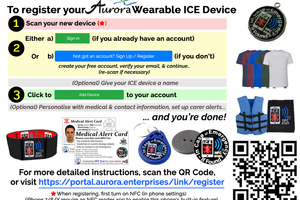
Help - How to Register a New Tag
Registering your tag to your account takes 3 easy steps: 1. Scan the device (*) https://aurorasmarttags.com/wp-content/uploads/tag720p.webm ------------------------------------------------------------ 2 Either: a) Sign In (If you already have an account) OR b) Register (If you don’t yet) Use the blue button - "Not got an account? Sign Up / Register" Create your free account, verify your email & sign-in + Continue the “Add a Device” process or rescan if necessary ------------------------------------------------------------ Optional Step - Give your tag a name ------------------------------------------------------------ 3. Click "Add" to register the tag to your account ------------------------------------------------------------ Optional Step - Make any changes you wish, such as personalise your message, set carer alerts ------------------------------------------------------------ ... and you are done! (*) Tap your tag against your phone's NFC reader. The position of the reader varies with different phone models. If you cannot get the tag to scan, check your phone's instructions for where your in-built reader is. Before scanning a tag, ensure NFC is on in your phone settings

Show Related Video
Show Featured Posts


About Aurora
What's in it for everyone
Help, Support and Contact
© Aurora 2026. All Rights Reserved
Site Language
At present this site only supports English, however more languages will be supported in the near future.